Last Updated: September 16, 2025
Cloning Emails (eXp Realty US + CAN)
If you are cloning emails in the eXp International HubSpot instance, please click here for proper instructions.
- Navigate to Marketing > Email
- Hover over your email and click Clone
- Choose which email type you want the cloned email to be
- Regular: A one-off personalized email that can be sent to a specific segment of contacts.
- Example: This email type can be used when sending an email to your active agents.
- Automated: A personalized email that can be arranged to send to specific contacts based on enrollment criteria/filters for a workflow.
- Example: This email type can be used when creating an automated drip campaign, allowing any contacts enrolled to receive this email.
- Regular: A one-off personalized email that can be sent to a specific segment of contacts.
- Click Clone
- Please ensure you are replacing the email copy, along with any additional content when cloning emails.
🚀 Pro Tip: Want more help on how to create and edit your emails? Click here for help!
Cloning Emails (eXp International)
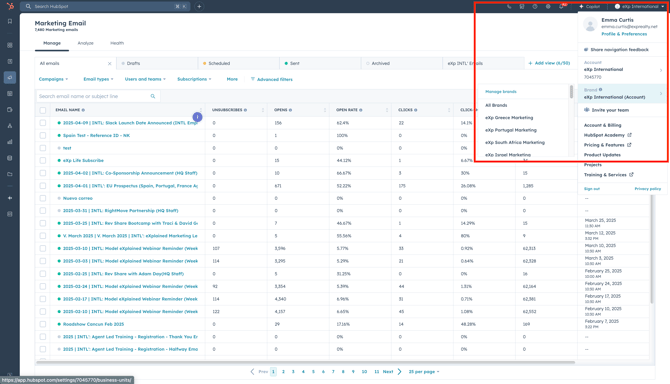
- Log into HubSpot
- Use the Brands drop-down menu and choose the respective Brand for your country.
- Navigate to Marketing > Email
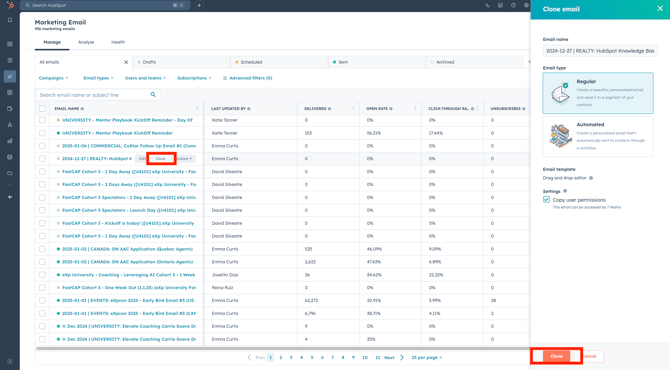
- Hover over your email and click Clone
- Choose the Brand you want to clone the email into.
- Choose which email type you want the cloned email to be:
- Regular: A one-off personalized email that can be sent to a specific segment of contacts.
- Example: This email type can be used when sending an email to your active agents.
- Regular: A one-off personalized email that can be sent to a specific segment of contacts.
-
-
- Automated: A personalized email that can be arranged to send to specific contacts based on enrollment criteria/filters for a workflow. Choose which email type you want the cloned email to be.
- Example: This email type can be used when creating an automated drip campaign, allowing any contacts enrolled to receive this email.
- Automated: A personalized email that can be arranged to send to specific contacts based on enrollment criteria/filters for a workflow. Choose which email type you want the cloned email to be.
-
- Click Clone
- Please ensure you are replacing the email copy, along with any additional content when cloning emails.
🚀 Pro Tip: Want more help on how to create and edit your emails? Click here for help!