
Last Update: September 16, 2025
Analyze Your Email Performance
If you are looking to analyze emails in the eXp International HubSpot instance, please ensure you are in the correct Brand for your country.
- Navigate to Marketing > Email
- Click the name of your sent email
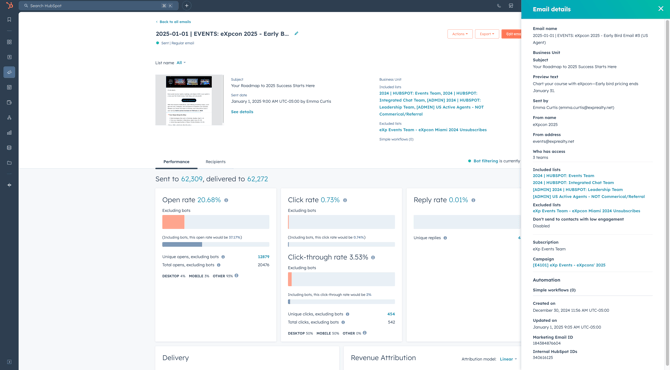
- Click See details to open a side panel that gives details about the email subject line, preview text, from address, etc.
Performance
The performance tab summarizes the overall engagement.
-
- Open rate: The percentage of contacts who have opened your email out of the contacts who delivered your email. An email open is counted when the images in the email load completely, or when the contact clicks on a link in the email even if the images do not load
- Click rate: The percentage of contacts who clicked a link in your email out of the contacts who delivered your email.
- Click-through rate: The percentage of contacts who clicked a link in your email out of the number of contacts who opened your email.
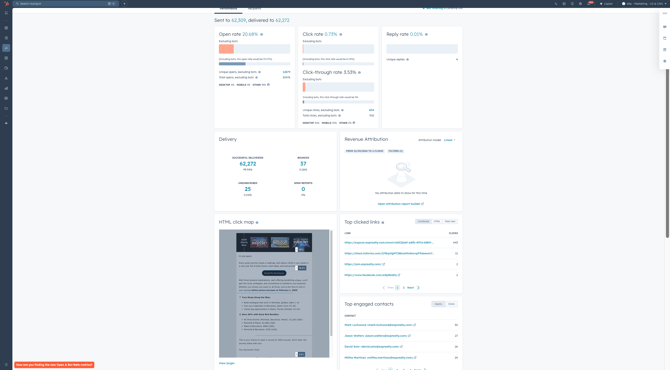
- Deliverability results: The numbers of successful deliveries, bounces, unsubscribes, and spam reports. To view these results, please use the “Recipients” tab inside the email performance.
- HTML map: Provides a visual breakdown of all clicked links in your email
- Top clicked links: To the right of the HTML Click Map, locate the top clicked links in your email.
- Top engaged contacts: To the right of the HTML Click Map, locate the top engaged contacts in your email.
- Time spent viewing email: Provides the contacts that read, skimmed, and/or glanced at your email.
- Read: The percentage of contacts who opened the email and viewed it for at least 8 seconds.
-
-
-
Skimmed: The percentage of contacts who opened the email and viewed it for 2 to 8 seconds.
-
Glanced: The percentage of contacts who opened the email and viewed it for less than 2 seconds.Time spent viewing the email: provides the contacts that read, skimmed, and/or glanced at your email.
-
-
Recipients
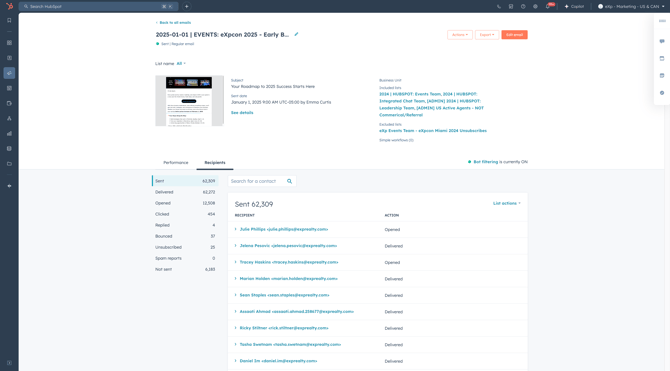
The recipient’s tab provides a granular view of your email’s deliverability and engagement.
-
- Sent: Contacts on your included recipient segments with the exception of blocked recipients(exclusion segments). Please note that HubSpot removes duplicates so no contact will receive more than one of the same email.
- Delivered: Contacts whose email server sent HubSpot a response stating that the email was delivered.
- Opened: Contacts who opened the email. Email opens are counted when the images in the email load completely, or when the contact clicks on a link in the email even if the images do not load.
- Clicked: Contacts who clicked any link in your email, excluding the unsubscribe or manage preferences links.
- Replied: Contacts who replied to an email sent from a connected inbox.
- Bounced: Contacts who bounced and didn’t receive the email. Each bounced contact will provide reasoning as to why the contact has bounced. To view this, click on the contact itself from the “Bounced” section of the Recipients tab.
- To learn more about HubSpot bounce types, please click here.
- Unsubscribed: Contacts who received the email and opted out of this or all email subscription types. Contacts that have unsubscribed will not receive future emails.
- Spam reports: Contacts who reported the email as spam to their email provider or manually dragged the email from their inbox to their junk folder. Contacts that are considered spam will not receive future emails.
- Not sent: Contacts who were dropped automatically to protect your email sender's reputation.
- For further information on email errors when sending to specific contacts, please click here.
Boost Engagement + Conversions: Mastering Email Marketing Optimization in HubSpot
HubSpot email metrics are extremely important when identifying which emails best resonate with our agents! The HubSpot team analyzes Open rates, Click rates, Click-through rates, and more to optimize future emails.
-
- Open rate: The percentage of contacts who have opened your email out of the contacts who delivered your email. An email open is counted when the images in the email load completely, or when the contact clicks on a link in the email even if the images do not load.
- Click rate: The percentage of contacts who clicked a link in your email out of the contacts who delivered your email.
- Click-through rate: The percentage of contacts who clicked a link in your email out of the number of contacts who opened your email.
🎯 Pro Tip: Click-through rate is the best email metric to analyze!